

Hard button resets:
There are multiple resets when using the hard button on the Doorstation.
- Announce IP address
- Set IP Address to static 192.168.1.100, Subnet 255.255.255.0, Gateway 192.168.1.1
- Set IP Address to DHCP
- Factory Reset Defaults
1. Announce IP Address: This will cause the speaker to audibly announce the current IP address of the Doorstation.
- Press and hold the RESET button.
- Wait until the red and green LED’s on the device come on simultaneously (approx. 20 seconds).
- Release the RESET button

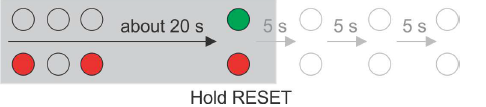
2. Set IP Address to Static Address: This will cause the Doorstation to be set to a static address of 192.168.1.100, Subnet Mask 255.255.255.0, Gateway 192.168.1.1.
- Press and hold the RESET button.
- Wait until the red and green LED’s on the device come on simultaneously (approx. 20 seconds).
- Wait until the red LED goes off (approx 5 seconds).
- Release the RESET button

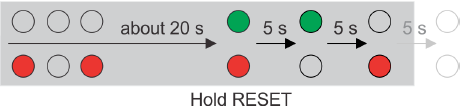
4. Factory Reset Defaults (Hard Button): This will reset the factory default values.
- Press and hold the RESET button.
- Wait until the red and green LED’s on the device come on simultaneously (approx. 20 seconds).
- Wait until the red LED goes off (approx 5 seconds).
- Wait until the green LED goes off and the red LED comes on again (another 5 seconds).
- Wait until the red LED goes off (another 5 seconds).
- Release the RESET button

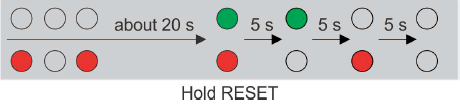
Depending on your model of Doorstation, the reset button can be found in different locations.
Doorstation (full size)


Doorstation Mini

